1. HarmonyOS Next
ArkTS
ArkTS mở rộng hệ sinh thái TypeScript (TS) để phát triển ứng dụng, kế thừa tất cả tính năng của TS và là siêu tập của TS.
ArkTS bổ sung struct và nhiều decorator trên nền TS để mô tả UI và quản lý trạng thái.
Đoạn mã dưới đây là ví dụ về component trang đăng nhập dựa trên HarmonyOS, thực hiện chức năng đăng nhập người dùng cùng các thao tác lưu trữ dữ liệu và chuyển hướng trang. Tôi sẽ giải thích từng phần và thêm chú thích.
2. Ví dụ
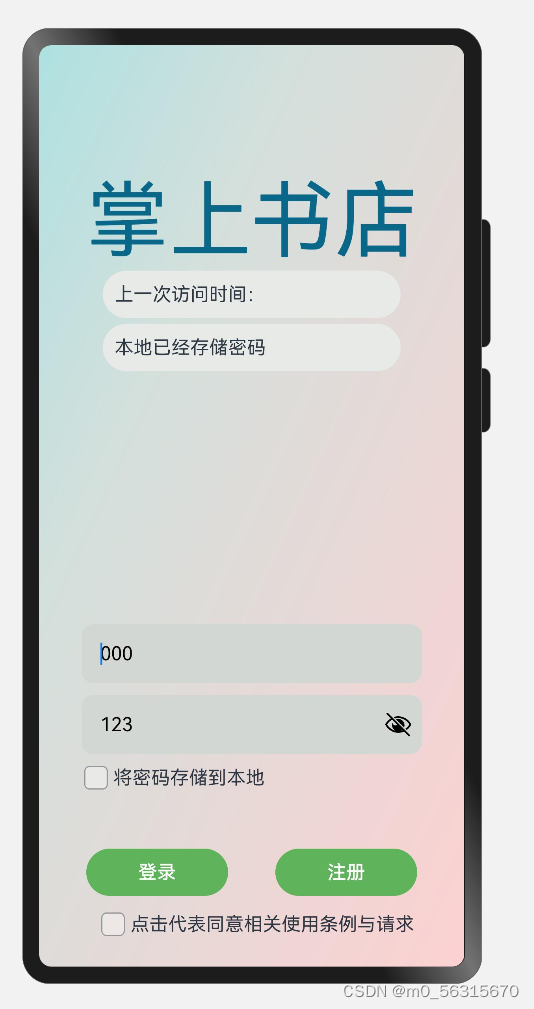
3. Phân chia chức năng
1.1. Lấy dữ liệu từ API backend qua HTTP
  async jwt(jwt: string) {
    try {
      const response = await this.httpUtil.request(`192.168.xxx.xxx/readers/userinfo`, {
        method: http.RequestMethod.GET,
        extraData: { no: jwt },
      });
      let data = JSON.parse(response.result.toString());
      return data;
    } catch (error) {
      throw error;
    }
  }
1.2. Dữ liệu API (có thể dùng JSON trực tiếp cho kiểm thử)
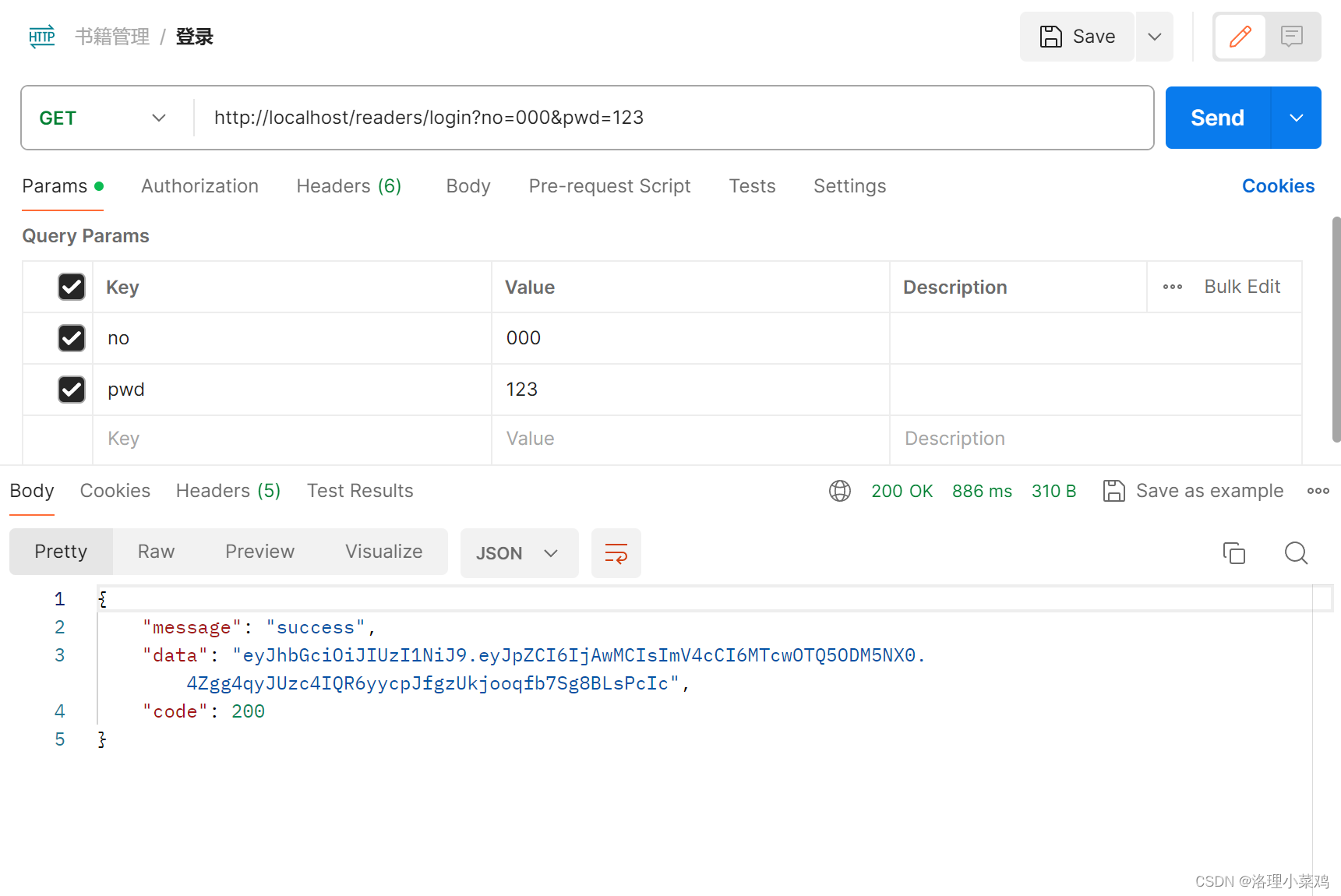
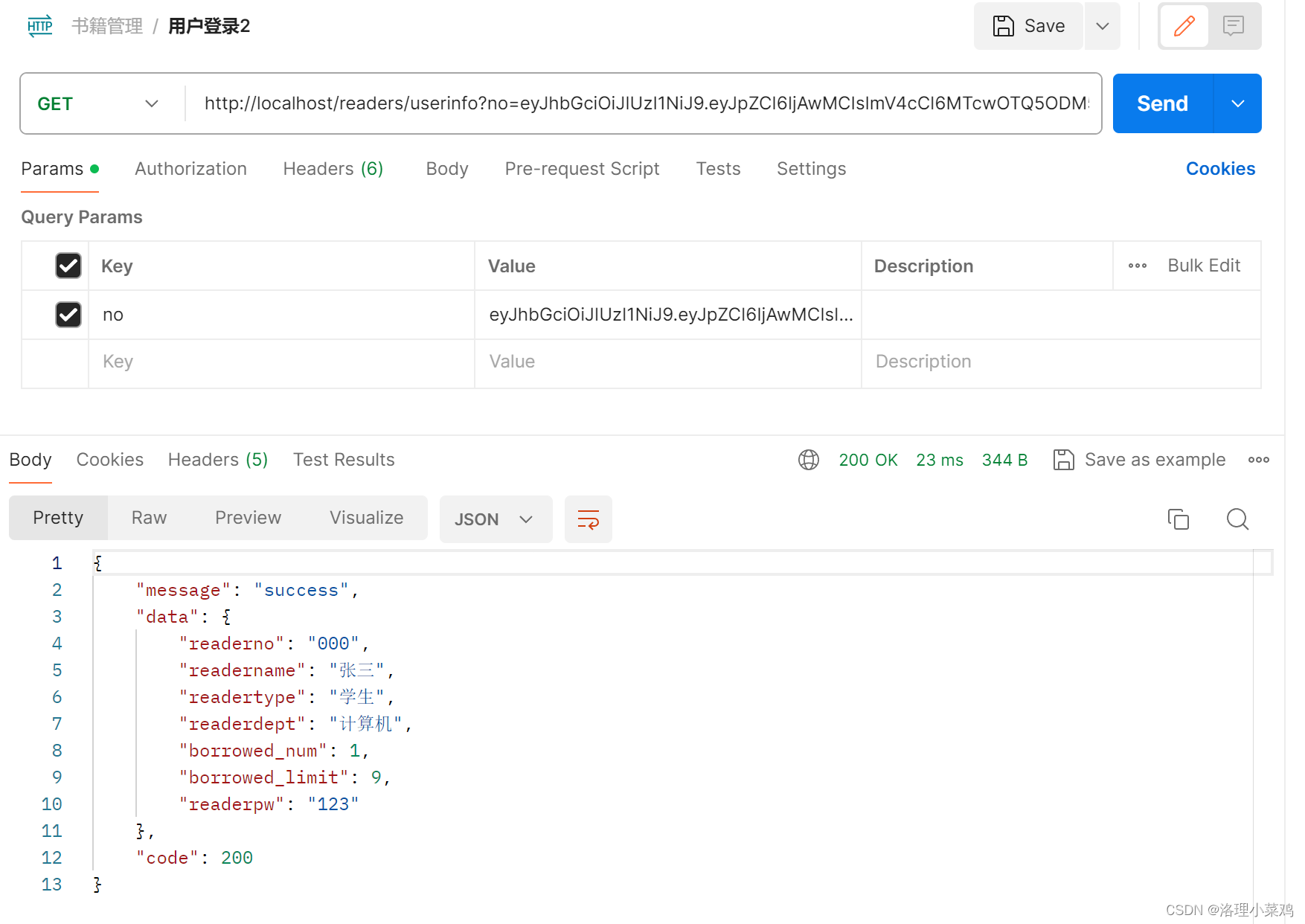
2. Sử dụng hàm vòng đời – aboutToAppear và aboutToDisappear
  aboutToAppear() {
    let httpRequest = http.createHttp()
    this.httpUtil = httpRequest
    // Khởi tạo thời gian truy cập trước đó
    this.fetchPreviousTime()
    // Khởi tạo thời gian hiện tại
    this.saveCurrentTimeToPreference()
    // Khởi tạo mật khẩu và tên người dùng từ cơ sở dữ liệu cục bộ
    this.loadUserInfo()
  }
3. AppStorage làm bộ đệm tiến trình, chỉ dùng trong thời gian chạy ứng dụng
4. DataPreferences lưu trữ bền vững, tồn tại trên máy người dùng
4. Cấu trúc phân lớp
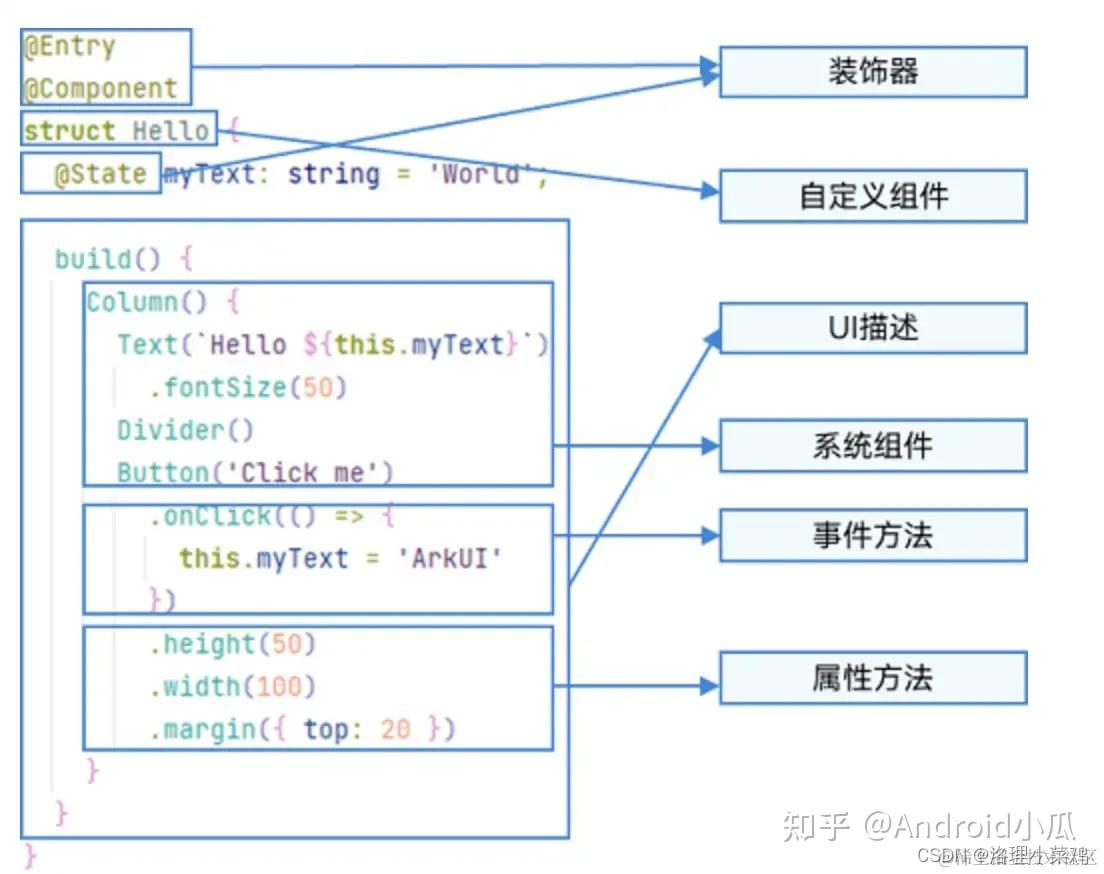
4. Minh họa mã nguồn
1. Import module:
import router from '@ohos.router'
import storage from '@ohos.data.storage'
import App from '@system.app'
import Prompt from '@system.prompt'
import http from '@ohos.net.http'
import { RouterInfo } from '../../Pojo/RouterInfo'
import common from '@ohos.app.ability.common'
import dataPreference from '@ohos.data.preferences'
2. Định nghĩa struct `Login`:
@Entry
@Component
struct Login {
    @State userName: string = ""
    @State password: string = ""
    @State isAgreed: boolean = false
    @State saveCredentials: boolean = true
    @State hasStoredCredentials: boolean = false
    @State lastVisitTime: string = ""

    // Các thuộc tính và phương thức khác...
}
3. Khởi tạo đối tượng `RouterInfo` và phương thức khởi tạo:
RouterInfo là một lớp tùy chỉnh
export class RouterInfo {
  name: string
  url: string
  message: string

  constructor(name: string, url: string, message: string) {
    this.name = name
    this.url = url
    this.message = message
  }
}

let routerData = new RouterInfo("Vào trang chủ", "pages/Books/Main", "Trang chủ")

aboutToAppear() {
    // Các thao tác khởi tạo, bao gồm tạo đối tượng HTTP, lấy thời gian truy cập trước đó, khởi tạo thời gian cục bộ,...
}
4. Phương thức chuyển hướng trang `goToPage()`:
goToPage(routerInfo: RouterInfo) {
    // Gọi module router để chuyển hướng trang
}
5. Phương thức bất đồng bộ lấy thông tin người dùng `fetchUserInfo()`:
async fetchUserInfo(jwtToken: string) {
    // Gửi yêu cầu mạng để lấy thông tin người dùng
}
6. Phương thức lưu thời gian hiện tại vào tùy chọn người dùng `saveCurrentTimeToPreference()`:
saveCurrentTimeToPreference() {
    const now: Date = new Date()
    const year: number = now.getFullYear()
    const month: number = now.getMonth() + 1
    const day: number = now.getDate()
    const hour: number = now.getHours()
    const minute: number = now.getMinutes()
    const second: number = now.getSeconds()

    const timeString = `Giờ Việt Nam: ${year}-${month}-${day} ${hour}:${minute}:${second}`

    dataPreference.getPreferences(this.context, "myBookStore").then(preferences => {
        preferences.put("currentTime", timeString).then(() => {
            preferences.flush()
        })
    }).catch((error: Error) => {
        console.error(error.message)
    })
}
7. Phương thức lấy thời gian truy cập trước đó `fetchPreviousTime()` và cập nhật thời gian khi đóng ứng dụng:
fetchPreviousTime() {
    dataPreference.getPreferences(this.context, "myBookStore").then(preferences => {
        if (!preferences.has("lastVisitTime")) {
            console.log("Chưa có dữ liệu lưu trữ")
        } else {
            preferences.get("lastVisitTime", 'null').then((value) => {
                this.lastVisitTime = value.toString()
                console.log("Dữ liệu: " + value)
            }).catch(() => {
                console.log("Đọc thất bại")
            })
        }
    })
}

updateTimeOnAppClose() {
    dataPreference.getPreferences(this.context, "myBookStore").then(preferences => {
        preferences.get("currentTime", '').then((currentTime) => {
            preferences.put("lastVisitTime", currentTime)
            preferences.put("currentTime", '')
            preferences.flush()
            console.log("Đã cập nhật thời gian cuối, xóa thời gian hiện tại")
        }).catch((error: Error) => {
            console.error(error.message)
        })
    }).catch((error: Error) => {
        console.error(error.message)
    })
}
8. Phương thức đăng nhập `performLogin()` và các phương thức hỗ trợ:
async performLogin() {
    if (this.userName && this.password && this.isAgreed) {
        try {
            const response = await this.httpUtil.request(`192.168.137.1/readers/login`, {
                method: http.RequestMethod.GET,
                extraData: { no: this.userName, pwd: this.password },
            })
            let jsonString = response.result.toString()
            let responseObject = JSON.parse(jsonString)

            if (responseObject['code'] === 200) {
                // Giải mã token
                const userData = await this.fetchUserInfo(responseObject['data'])
                // Lưu token vào AppStorage
                AppStorage.SetOrCreate("userToken", userData['data']['readerno'])

                // Lưu thông tin đăng nhập nếu được chọn
                if (this.saveCredentials) {
                    this.storeUserCredentials()
                }
                // Chuyển hướng
                this.goToPage(this.routerData)
            }
        } catch (error) {
            console.error(error)
            Prompt.showDialog({
                message: "Đăng nhập thất bại",
            })
        }
    } else {
        if (!this.userName || !this.password) {
            Prompt.showDialog({
                message: "Vui lòng nhập tên người dùng và mật khẩu",
            })
        } else if (!this.isAgreed) {
            Prompt.showDialog({
                message: "Vui lòng đồng ý với điều khoản",
            })
        }
    }
}

storeUserCredentials() {
    dataPreference.getPreferences(this.context, "myBookStore").then(preferences => {
        let userInfo = { 'username': this.userName, 'password': this.password }
        preferences.put("userCredentials", JSON.stringify(userInfo)).then(() => {
            preferences.flush()
        })
    }).catch((error: Error) => {
        console.error(error.message)
    })
}

loadUserInfo() {
    dataPreference.getPreferences(this.context, "myBookStore").then(preferences => {
        preferences.get("userCredentials", '').then((credentials) => {
            let user = JSON.parse(credentials.toString())
            if (user) {
                this.hasStoredCredentials = true
                this.userName = user['username']
                this.password = user['password']
            }
        }).catch((error: Error) => {
            console.error(error.message)
        })
    }).catch((error: Error) => {
        console.error(error.message)
    })
}
9. Phương thức xây dựng giao diện `build()`:
build() {
    // Xây dựng bố cục trang, bao gồm input, button, checkbox,...
}
Đoạn mã này triển khai một trang đăng nhập đơn giản, bao gồm các chức năng nhập liệu, yêu cầu mạng, lưu trữ dữ liệu, sử dụng các module của HarmonyOS để thực hiện.
5. Mã nguồn đầy đủ
import router from '@ohos.router'
import storage from '@ohos.data.storage'
import App from '@system.app'
import Prompt from '@system.prompt'
import http from '@ohos.net.http'
import { RouterInfo } from '../../Pojo/RouterInfo'
import common from '@ohos.app.ability.common'
import dataPreference from '@ohos.data.preferences'

@Entry
@Component
struct Login {
    @State userName: string = ""
    @State password: string = ""
    @State isAgreed: boolean = false
    @State saveCredentials: boolean = true
    @State hasStoredCredentials: boolean = false
    @State lastVisitTime: string = ""
    httpUtil: http.HttpRequest
    context = getContext(this) as common.UIAbilityContext
    @State lastTime: string = ''
    routerData = new RouterInfo("Vào trang chủ", "pages/Books/Main", "Trang chủ")

    aboutToAppear() {
        let httpRequest = http.createHttp()
        this.httpUtil = httpRequest
        this.fetchPreviousTime()
        this.saveCurrentTimeToPreference()
        this.loadUserInfo()
    }

    aboutToDisappear() {
        this.updateTimeOnAppClose()
    }

    goToPage(routerInfo: RouterInfo) {
        router.pushUrl({
            url: routerInfo.url,
            params: {
                title: routerInfo.message
            }
        },
            router.RouterMode.Single,
            error => {
                if (error) {
                    console.log("Chuyển hướng thất bại: " + error.code + ':' + error.message)
                }
            })
    }

    async fetchUserInfo(jwtToken: string) {
        try {
            const response = await this.httpUtil.request(`192.168.137.1/readers/userinfo`, {
                method: http.RequestMethod.GET,
                extraData: { no: jwtToken },
            })
            let data = JSON.parse(response.result.toString())
            return data
        } catch (error) {
            throw error
        }
    }

    saveCurrentTimeToPreference() {
        const now: Date = new Date()
        const year: number = now.getFullYear()
        const month: number = now.getMonth() + 1
        const day: number = now.getDate()
        const hour: number = now.getHours()
        const minute: number = now.getMinutes()
        const second: number = now.getSeconds()
        const timeString = `Giờ Việt Nam: ${year}-${month}-${day} ${hour}:${minute}:${second}`

        dataPreference.getPreferences(this.context, "myBookStore").then(preferences => {
            preferences.put("currentTime", timeString).then(() => {
                preferences.flush()
            })
        }).catch((error: Error) => {
            console.error(error.message)
        })
    }

    fetchPreviousTime() {
        dataPreference.getPreferences(this.context, "myBookStore").then(preferences => {
            if (!preferences.has("lastVisitTime")) {
                console.log("Chưa có dữ liệu lưu trữ")
            } else {
                preferences.get("lastVisitTime", 'null').then((value) => {
                    this.lastTime = value.toString()
                    console.log("Dữ liệu: " + value)
                }).catch(() => {
                    console.log("Đọc thất bại")
                })
            }
        })
    }

    updateTimeOnAppClose() {
        dataPreference.getPreferences(this.context, "myBookStore").then(preferences => {
            preferences.get("currentTime", '').then((currentTime) => {
                preferences.put("lastVisitTime", currentTime)
                preferences.put("currentTime", '')
                preferences.flush()
                console.log("Đã cập nhật thời gian cuối, xóa thời gian hiện tại")
            }).catch((error: Error) => {
                console.error(error.message)
            })
        }).catch((error: Error) => {
            console.error(error.message)
        })
    }

    async performLogin() {
        if (this.userName && this.password && this.isAgreed) {
            try {
                const response = await this.httpUtil.request(`192.168.137.1/readers/login`, {
                    method: http.RequestMethod.GET,
                    extraData: { no: this.userName, pwd: this.password },
                })
                let jsonString = response.result.toString()
                let responseObject = JSON.parse(jsonString)

                if (responseObject['code'] === 200) {
                    const userData = await this.fetchUserInfo(responseObject['data'])
                    AppStorage.SetOrCreate("userToken", userData['data']['readerno'])

                    if (this.saveCredentials) {
                        this.storeUserCredentials()
                    }
                    this.goToPage(this.routerData)
                }
            } catch (error) {
                console.error(error)
                Prompt.showDialog({
                    message: "Đăng nhập thất bại",
                })
            }
        } else {
            if (!this.userName || !this.password) {
                Prompt.showDialog({
                    message: "Vui lòng nhập tên người dùng và mật khẩu",
                })
            } else if (!this.isAgreed) {
                Prompt.showDialog({
                    message: "Vui lòng đồng ý với điều khoản",
                })
            }
        }
    }

    storeUserCredentials() {
        dataPreference.getPreferences(this.context, "myBookStore").then(preferences => {
            let userInfo = { 'username': this.userName, 'password': this.password }
            preferences.put("userCredentials", JSON.stringify(userInfo)).then(() => {
                preferences.flush()
            })
        }).catch((error: Error) => {
            console.error(error.message)
        })
    }

    loadUserInfo() {
        dataPreference.getPreferences(this.context, "myBookStore").then(preferences => {
            preferences.get("userCredentials", '').then((credentials) => {
                let user = JSON.parse(credentials.toString())
                if (user) {
                    this.hasStoredCredentials = true
                    this.userName = user['username']
                    this.password = user['password']
                }
            }).catch((error: Error) => {
                console.error(error.message)
            })
        }).catch((error: Error) => {
            console.error(error.message)
        })
    }

    build() {
        Column() {
            Column() {
                Text("Cửa hàng sách di động")
                    .fontColor('#096789')
                    .fontSize(70)
                this.showInfo("Lần truy cập trước: " + this.lastTime)
                if (this.hasStoredCredentials) {
                    this.showInfo("Mật khẩu đã được lưu cục bộ")
                }
            }.margin({ bottom: 100 })
                .height('50%')
                .justifyContent(FlexAlign.Center)

            Column() {
                Row() {
                    TextInput({ placeholder: this.userName === '' ? "Nhập tên người dùng" : this.userName })
                        .type(InputType.Normal)
                        .width('80%')
                        .height(50)
                        .placeholderColor(Color.Black)
                        .backgroundColor('#ffd3d7d3')
                        .borderRadius(10)
                        .margin({ bottom: 10 })
                        .onChange(val => {
                            this.userName = val
                            console.log(val)
                        })
                }

                Row() {
                    TextInput({ placeholder: this.password === '' ? "Nhập mật khẩu" : this.password })
                        .type(InputType.Password)
                        .width('80%')
                        .height(50)
                        .placeholderColor(Color.Black)
                        .backgroundColor('#ffd3d7d3')
                        .borderRadius(10)
                        .onChange(val => {
                            this.password = val
                            console.log(val)
                        })
                }

                Row() {
                    Row() {
                        Checkbox().onChange((checked: boolean) => {
                            this.saveCredentials = checked
                            console.log('Checkbox thay đổi: ' + checked)
                        })
                        Text("Lưu mật khẩu vào máy")
                    }.width('98%')
                        .padding({ left: 30 })
                        .height('40')
                }.margin({ bottom: 40 })

                Row() {
                    Button("Đăng nhập")
                        .width(120)
                        .height(40)
                        .fontColor(Color.White)
                        .onClick(() => {
                            this.performLogin()
                        })
                        .backgroundColor('#ff5eb35b')
                        .margin({ right: 40 })
                        .borderStyle(BorderStyle.Dotted)

                    Button("Đăng ký")
                        .width(120)
                        .height(40)
                        .fontColor(Color.White)
                        .onClick(() => {
                            router.pushUrl({
                                url: "pages/Register"
                            })
                        })
                        .backgroundColor('#ff5eb35b')
                }
                .justifyContent(FlexAlign.SpaceEvenly)
            }
            .width("100%")
            .height("30%")

            Row() {
                Checkbox().onChange((checked: boolean) => {
                    this.isAgreed = checked
                    console.log('Checkbox thay đổi: ' + checked)
                })
                Text("Nhấn để đồng ý với điều khoản sử dụng")
            }.width('90%')
                .padding({ left: 30 })
                .height('40')
        }
        .height('100%')
        .width('100%')
        .margin({ bottom: 20 })
        .linearGradient({
            direction: GradientDirection.RightBottom,
            colors: [[0xAEE1E1, 0.0], [0xD3E0DC, 0.3], [0xFCD1D1, 1.0]]
        })
    }

    @Builder showInfo(message: string) {
        Row() {
            Text(message)
                .fontColor("#ffe7eae7")
        }.width("70%")
            .height("40")
            .backgroundColor("#ffe7eae7")
            .borderRadius(20)
            .padding({ left: 10 })
            .margin({ bottom: 5 })
    }
}